Don't just read about supply chains. Run one.
Students design a supply chain, run it with ERP-style orders and receipts, and see what every decision costs. You choose the labs; SCMBase grades the work.
Textbook, slides and labs included · Free for faculty · Runs in the browser
Your course, ready to teach. Free for faculty.
A textbook, a quick-start guide, guided labs, instructor's editions and complete slide decks: everything you need to teach the course, built around one platform. Start with a free faculty account and try it before you put SCMBase in front of a class.
Textbooks and a quick-start guide
The SCMBase Lab Quick Start, and two textbooks, Supply Chain Management in Practice and ERP in Practice, with instructor's editions (answers and teaching notes). Students get the student editions with their seat.
Complete slide decks
A deck for every chapter, with speaker notes, in the SCMBase style and ready to edit: all ten for Supply Chain Management in Practice and all nine for ERP in Practice.
Guided labs
Twelve supply chain labs, six ERP labs and two projects, from EOQ and reorder points to MRP and the books. Once you're approved, every one is open to you.
Your own labs and leaderboards
Upload your own labs, or copy one of ours and change it, and share them with other instructors. Your class's projects get live leaderboards. Set rules for your own labs, such as a budget students can't go over or the transport they may use.
Grading you can trust
Every submission is re-run on the server with the same model, so results can't be edited or copied.
Classes and grade export
Create a class, share a join code, choose which labs it can open and export grades to a spreadsheet.
Nothing to install
It runs in the browser on student laptops, on or off campus.
What you get, free and with a paid class
| Free faculty account | With a paid class | |
|---|---|---|
| Every lab: twelve supply chain labs, six ERP labs and two projects | ||
| The SCMBase Lab Quick Start | ||
| Slide decks for every chapter, to view and present online | ||
| Slide decks to download and edit, with speaker notes | – | |
| Both textbooks, with instructor's editions (answers and teaching notes) | – | |
| Classes, join codes, automatic grading and grade export | – | |
| For your students: the labs, the course videos and the student editions of the textbooks | – | |
| Game mode: build and run your own company | ||
| A game board for your class, on the projector | – | |
| Your own labs, lab rules and leaderboards | – | Add-on |
A paid class is charged per student per month, by invoice to your department. See pricing.
Create your free faculty account
Free for faculty, always. It takes a minute.
Prefer a walkthrough? Email us for a 30-minute demo at hello@scmbase.com.
- 1Sign up with your institutional email
Takes a minute. We'll send a code to confirm it's you. - 2Get approved
We check that you teach, usually within a working day. - 3Start teaching
Unlock every lab, download the SCMBase Lab Quick Start, view every slide deck online, and preview the first chapter of each course. When you're ready to teach, we set up your classes.
By signing up you agree to the terms; the privacy notice says what we keep and why.
From an empty map to a working supply chain
Each student runs their own company, so every decision and every result is theirs.
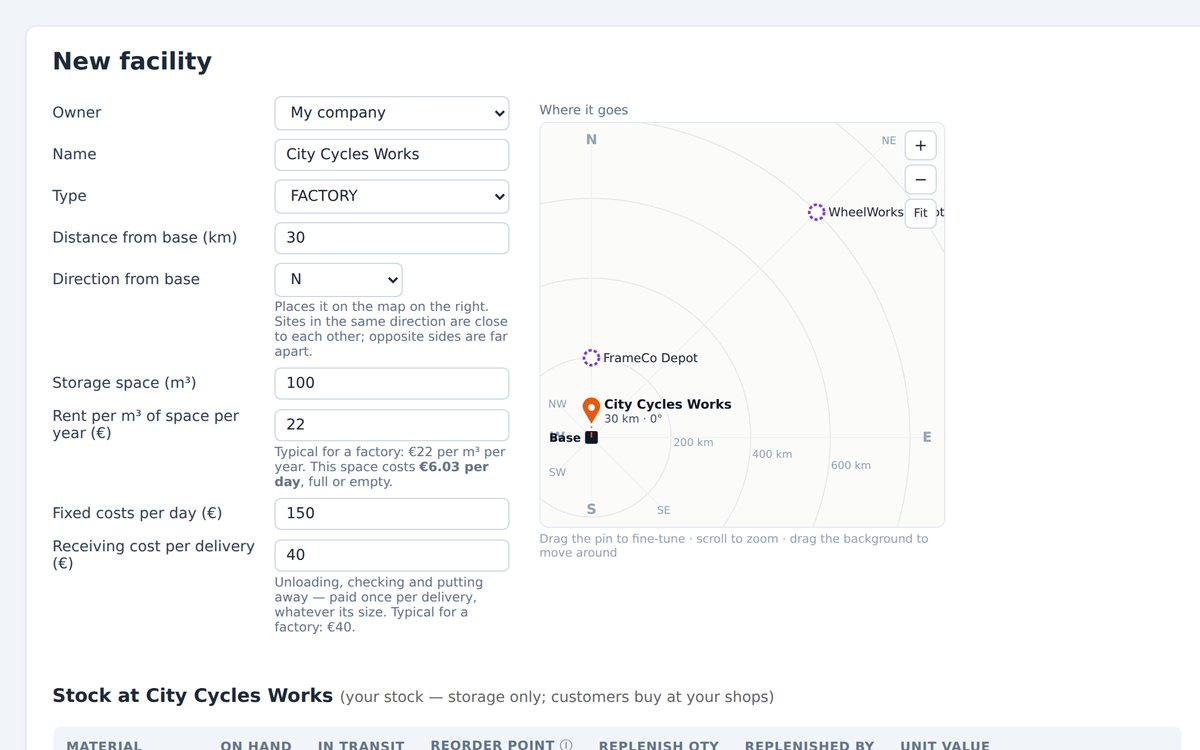
Build the network
Add suppliers, factories, warehouses and shops on a map, with materials, recipes and transport.
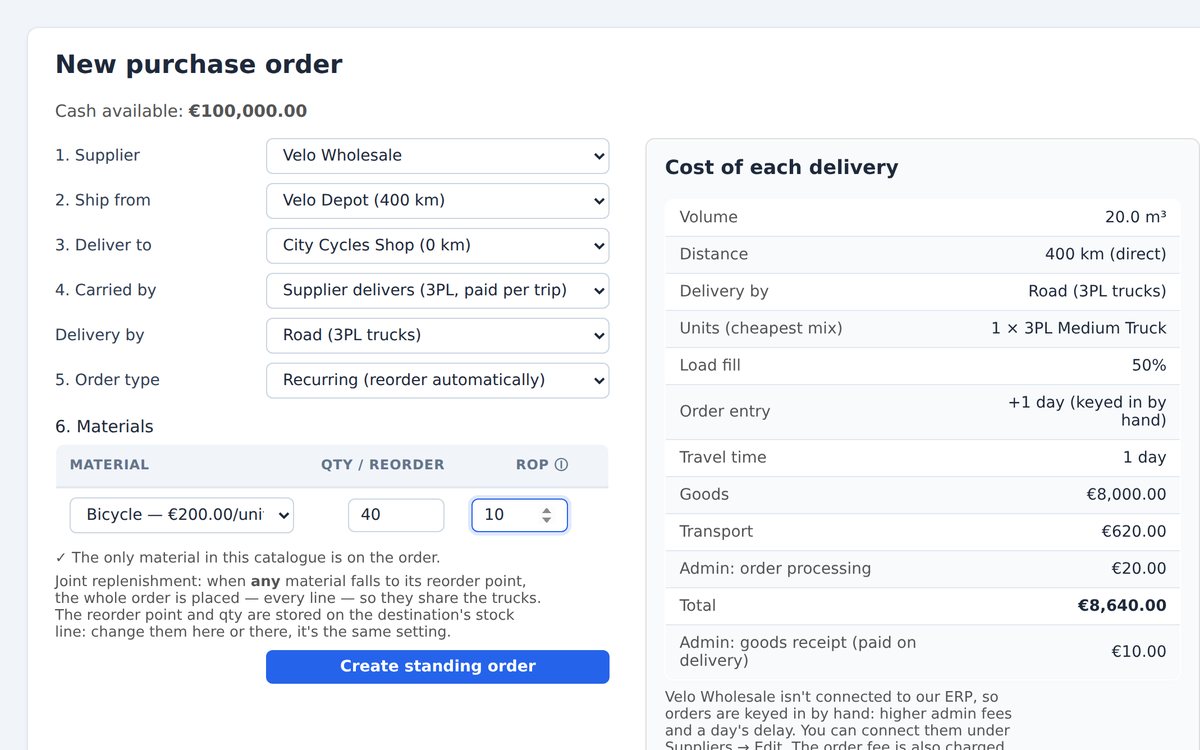
Place the orders
Raise purchase, transfer and work orders and receive the goods, the same documents an ERP system uses. Set reorder points, order quantities and safety stock.
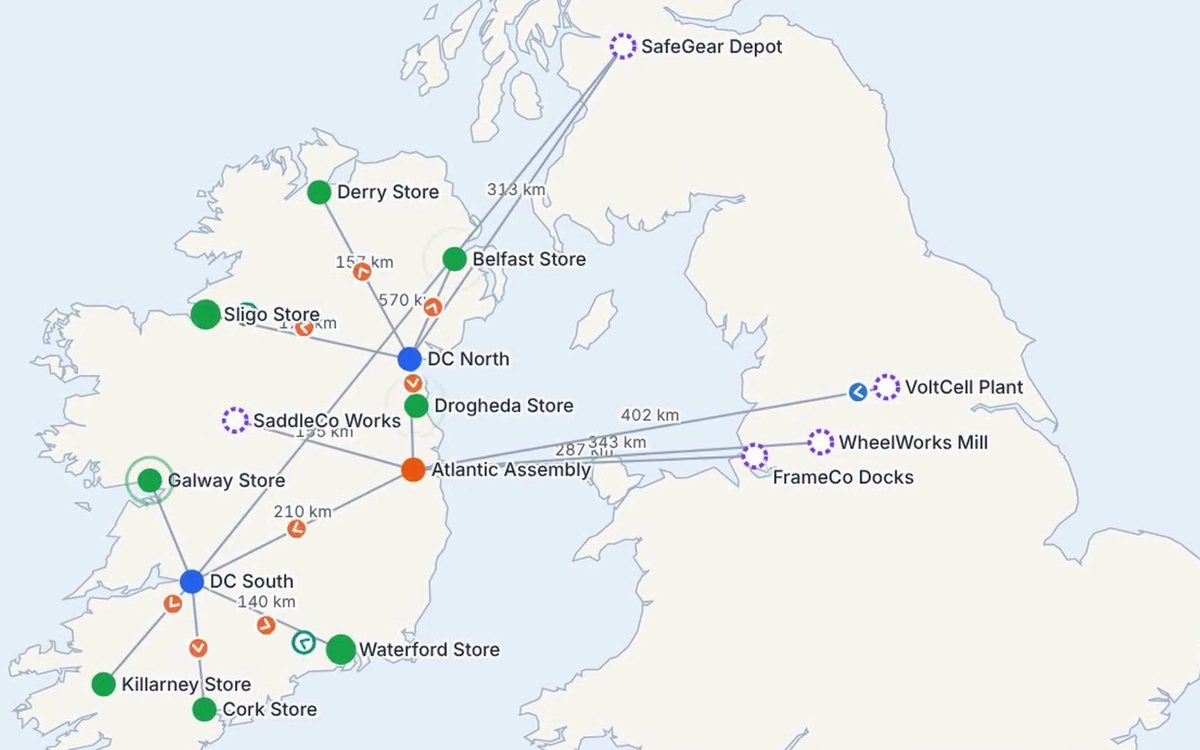
Run it day by day
Watch trucks move and stock rise and fall. Trial runs show the outcome without changing the game.
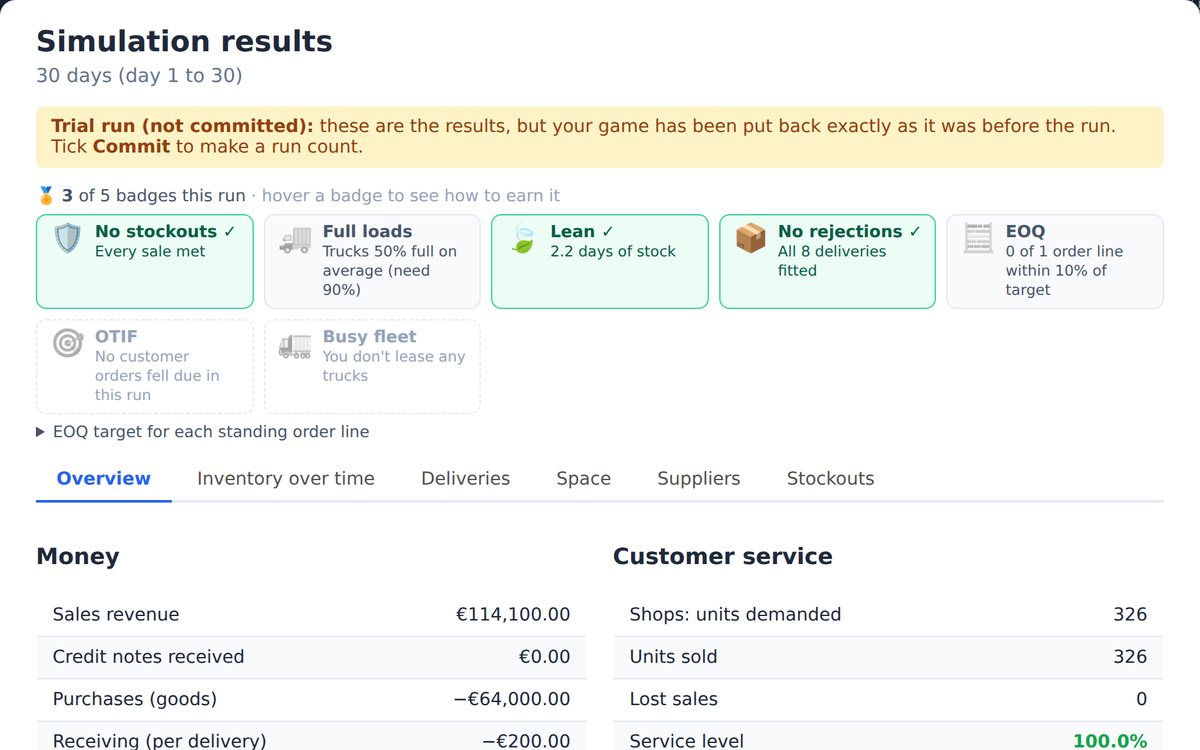
Read the results
Profit, service level, stock against its target zone, fleet use, and badges for good practice.
Run your own supply chain company
Build your own supply chain company on the map of Ireland and Britain, run it day by day and watch it earn. Real books, real decisions.
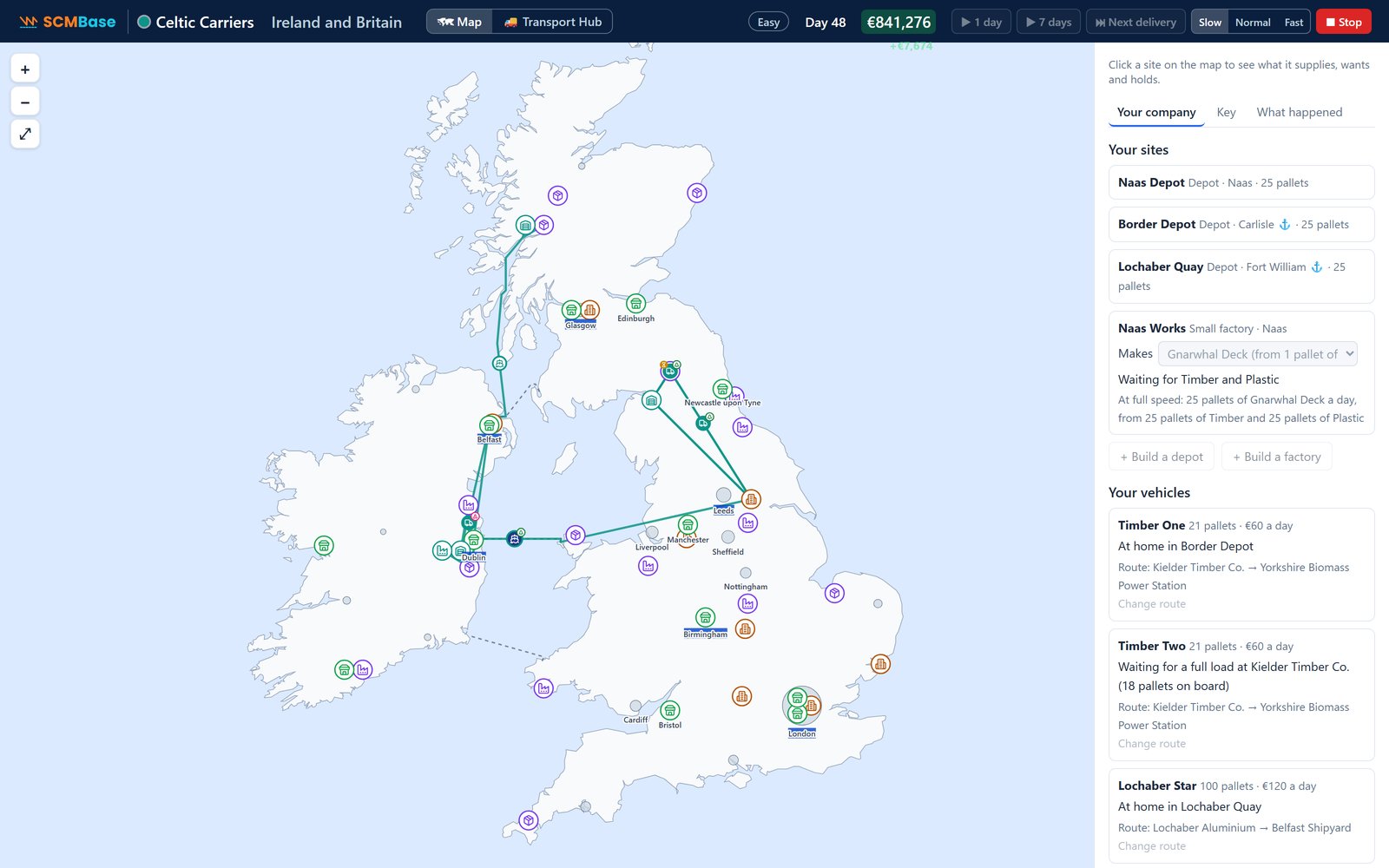
Build
Depots and factories in real towns, and vans, trucks and coasters on routes you plan. Trucks cross the Irish Sea on the ferries.
Deal
Offer shops and buyers a price. Ask too much and they say no. Suppliers trust a regular customer, with a bigger share and a discount.
Run it and watch it earn
A day, a week or until you stop. The cash flashes as money comes in and goes out, and What happened lists every load, sale and cost.
Real books
Every sale, cost and building is posted to the ledger. The score is real accounting, not a made-up number.
A guided tutorial, Your first company, sets up a skateboard-deck maker near Dublin in 11 steps.
A class competition
Put your class on a leaderboard ranked by company value, with your own rules (at least two factories, say), and show it on the projector. The server works out every figure from its own run of the game, so results can't be faked.
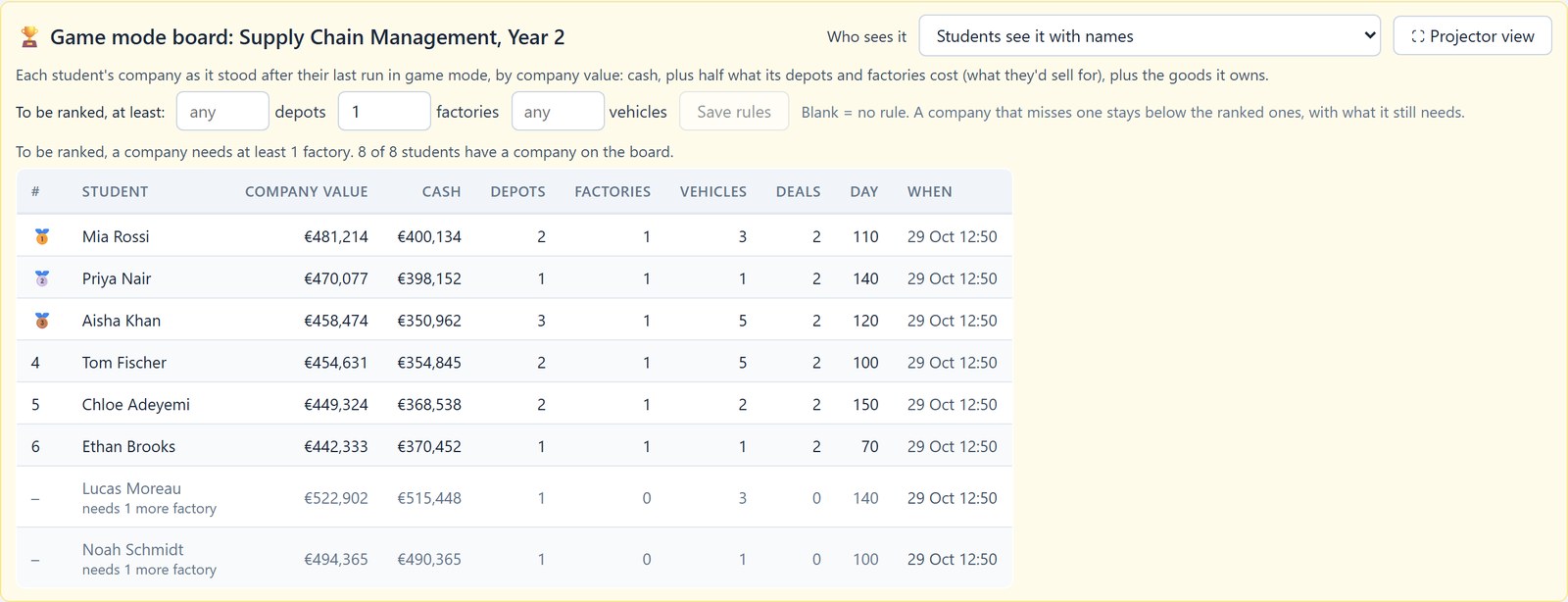
Game mode comes with every class seat and with Single User, at no extra cost, and your free faculty account has it too, once it's approved. It isn't in the Try it free account.
Fits the courses you already teach
Operations, supply chain, logistics and procurement, from intro courses to master's programs.
Two books, one series
By Dr. Damien Mac Namara. Each book follows its own story, with hands-on labs in SCMBase. Read either on its own, or both together.
Supply Chain Management in Practice
From demand forecasting and inventory to transport, suppliers, the bullwhip effect, sustainability and risk, with twelve supply chain labs and two projects.
ERP in Practice
Follow DiceBox Games from spreadsheets to an ERP system: buying, making, selling, MRP, people and the books, with six ERP labs and a project.
Both books: $54.99 for the two PDFs, once the Supply Chain Management in Practice PDF is on sale. Both paperbacks are on Amazon now.
Coming soon: the SCMBase Certificate in ERP Systems, with short videos, the book online, hands-on labs and a final exam.
Learning on your own
Teaching a class? Faculty accounts are free: create yours, and your department can order for your class. For everyone else:
- SCM Lab 1, A new market, and ERP Lab 1, Buying for DiceBox
- 5 simulation runs a day
- Nothing to install
- Every supply chain lab and both projects
- Game mode: build and run your own company
- As many runs as you need
- Your games saved by name
- The SCMBase Lab Quick Start guide
ERP in Practice and Supply Chain Management in Practice (coming soon), by Dr. Damien Mac Namara.
See the booksPrices in US dollars, including sales tax where it applies. Single User and the books go on sale soon; payments will be handled by Paddle. Cancel anytime: you keep access to the end of the period you've paid for. See the refund policy. Outside the US? See prices in euros.

Built by a supply chain instructor
I'm Dr. Damien Mac Namara. I've been teaching supply chain management and ERP for many years. Alongside teaching, I run a small games company, and I've long been interested in what games and gamification can do for learning. That's why I created SCMBase, a supply chain simulation where students build a chain from its parts (suppliers, factories, warehouses, shops, trucks and orders), then run it day by day. In ERP mode, the same students run a company's buying, making, selling, people and books, and the two textbooks take them through it, lab by lab.
Questions faculty ask
How much does it cost?
Faculty accounts are free to try. A class is priced per student per month: $12 for one course (SCM or ERP) or $15 for both. That includes the labs with automatic grading, game mode, the course videos and the student edition of the textbook, and your classes, with a game board for each, the slide decks to download and edit, the full textbook and the instructor's edition open when it starts. The Lab builder and leaderboards is an optional add-on at $2 per student per month.
We invoice your department once, when the class is set up, for the students and the months it runs. No student costs more than six months' worth, however long the course runs. Invoices start at 10 students and 3 months. The class is full at the number of students you order; more seats or months can be added with a new purchase order, at the same rate. Access ends on the class's end date. Prices are before tax.
40 students × 3 months × $12 = $1,440, or $36 a student.
If they take both courses: 40 × 3 × $15 = $1,800, or $45 a student.
Add the Lab builder and leaderboards to the SCM course: 40 × 3 × $2 = $240, so $1,680 in all.
A year-long course is capped at six months: 40 × 6 × $12 = $2,880.
Order for a class → Your department gets a quotation by email.
On their own, Single User is $19 a month, with the ERP upgrade +$9.
Can I write my own labs?
Yes, with the Lab builder and leaderboards add-on ($2 per student per month on a class order). Upload a lab file, or copy one of SCMBase's labs and change it, then tick it for your classes like any other lab. You can share your labs in a library for other instructors, credited to you. Any instructor can use a shared lab for free, without the add-on.
Can I limit what students do in a lab?
Yes, in the labs you design, with the Lab builder and leaderboards add-on. A lab's rules can set a budget students can't go over, limit what they may add (no new suppliers, say, or at most one warehouse), lock the lab's own materials and sites, allow only some transport, turn pages off and fix how long each run is. Students see the rules in the lab panel, and anything turned off is greyed out with a short reason. SCMBase's own labs don't use rules.
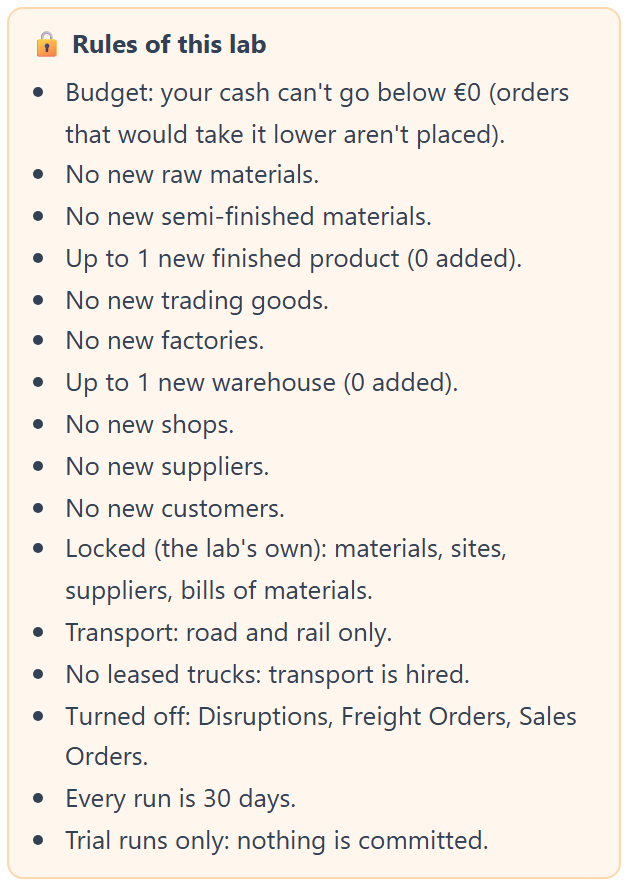
The rules as students see them, in an example lab.
What are the leaderboards?
Live rankings for your class's projects, worked out by the server from students' own runs. You choose who sees the board, and there's a view for the projector. They come with the Lab builder and leaderboards add-on.
Is there a game?
Yes: game mode. Students start a company with a pot of money, build depots, factories and routes on the map of Ireland and Britain, strike deals with shops and suppliers, and run it day by day. Every sale and cost goes into real books. A guided tutorial, Your first company, gets them started. Game mode comes with every class seat and with Single User at no extra cost, and your free faculty account has it too, once it's approved.
Can I run a class competition?
Yes, with the game board, which every class has (it isn't part of the Lab builder and leaderboards add-on). It ranks each student's company by its value: cash, half what its depots and factories cost, and the goods it owns. You can add rules, such as at least two factories; a company that misses one stays on the board, unranked, with what it still needs. Show it on the projector, with or without names; it refreshes every 20 seconds. The server works out every figure from its own run of the game, so results can't be faked.
How should students use the book and the labs?
We suggest the instructions in the book. Open a lab with its instructions switched off: students get the lab's company and data, and the lab panel shows each step's title only, so they follow the steps printed in the book. The panel still ticks each step and points out mistakes, so they know when to move on, but they can't just click through instructions on the screen. Your class dashboard shows their progress as they work, and highlights the steps where most of them go wrong. Switch the instructions on for anyone who's really stuck.
Where is student data kept?
On SCMBase's server, hosted by Namecheap in Phoenix, Arizona. We hold names, email addresses, game saves and grades, and delete them 90 days after the class ends; the nightly backups are gone within ten weeks after that. Our data processing agreement is ready for your institution to sign.
What do students need?
A laptop or desktop with an up-to-date browser. Nothing to install.
Does it work with Canvas, Blackboard, Brightspace or Moodle?
Not yet; integration is planned. Until then, grades export to a spreadsheet you can upload.
Is it accessible?
[Accessibility statement: WCAG 2.2 AA status and any known gaps.]